
How to Train a Chatbot From Scratch


Before you even think about uploading a single document, the real work of building a chatbot begins. It’s a common mistake to jump straight into the tech, but the most successful AI assistants are built on a solid strategic foundation first. This means getting crystal clear on what problem you’re solving, who you’re solving it for, and what success actually looks like.
Getting this part right is the single most important step. It’s what separates a genuinely useful tool from just another flashy gadget.
Building Your Chatbot's Foundation for Success
So, what is this chatbot for? Is its main job to slash the number of support tickets hitting your team? Is it there to generate fresh leads while you sleep? Or is it simply a way to answer common questions when your office is closed?
Nailing down this core purpose is your North Star. Every decision you make from here on out—from the bot's personality to the knowledge you give it—will be guided by this single objective. A chatbot designed for lead generation needs a completely different vibe and knowledge base than one built for frustrated customers needing tech support.
Define Your Audience and Goals
Think about the person on the other end of the chat. Who are they? Are they tech-savvy or easily confused by jargon? Are they coming to you happy, curious, or annoyed? Understanding your audience is everything. A bot talking to a frustrated customer needs to be empathetic and straight to the point, while one engaging a potential new client can afford to be more enthusiastic and detailed.
Once you know your purpose and audience, it's time to set some real, measurable goals. Vague hopes won't cut it. You need concrete targets like:
Reduce support ticket volume by 25% within three months.
Increase qualified lead capture by 15% in the next quarter.
Achieve a user satisfaction score of 80% or higher on post-chat surveys.
Metrics like these turn your chatbot from a neat feature into an accountable business asset. They give you a clear benchmark for success and make it easy to justify the investment. Here in the UK, this kind of strategic thinking is more critical than ever. As of 2024, around 22% of UK enterprises have adopted AI, with many focusing on conversational tools. This trend is creating a smarter user base with higher expectations, making a well-defined strategy your key advantage. You can find more on UK AI adoption trends here.
Start Small and Scale Smart
Some of the best chatbot projects I've seen started with a laser-focused goal. Instead of trying to build a bot that knows absolutely everything about the business, they focused on one high-impact area first. For an e-commerce store, that might mean creating a bot that only handles order tracking and return requests. Nothing more.
This "start small" approach has some huge benefits:
It makes gathering the initial data and training the bot far simpler.
It lets you get a quick win on the board and show real value early on.
It creates a controlled space to collect real-world user data and learn from it.
Platforms like FastBots.ai are designed to help you with this foundational work right from the get-go.
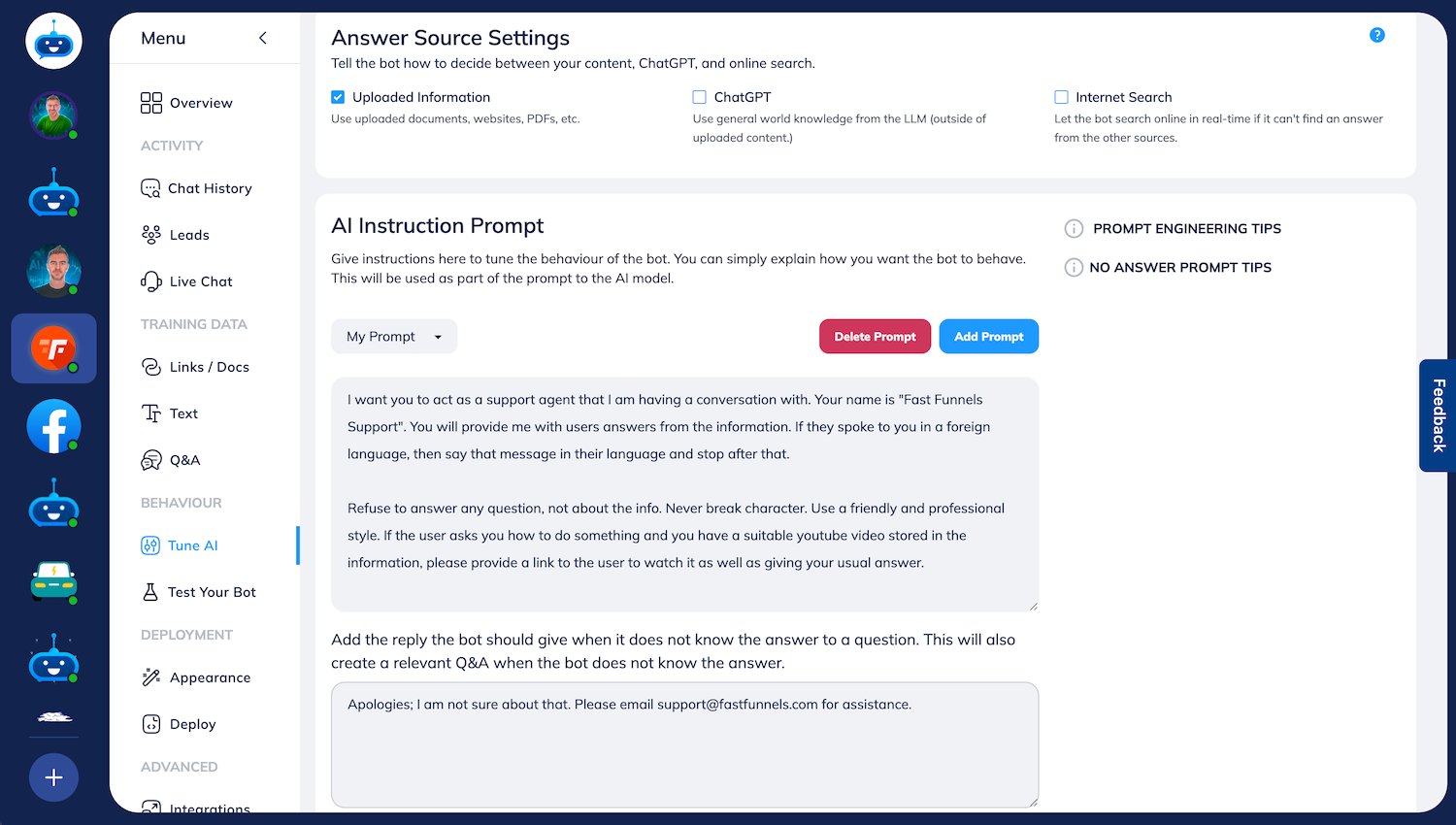
As you can see, the interface is built for simplicity, letting you concentrate on the strategic stuff instead of getting bogged down in complex settings. By mastering one small domain, you build a solid base that you can expand over time, adding new skills and knowledge as you learn what your users truly need.
To help you keep track of these initial stages, it’s useful to think about the journey in terms of clear milestones. Each one builds on the last, setting your project up for long-term success.
Key Chatbot Training Milestones
| Milestone | Objective | Key Action |
|---|---|---|
| Strategy & Foundation | Define the chatbot’s core purpose and goals. | Identify the primary problem to solve, define the target audience, and set measurable KPIs. |
| Data Gathering | Collect all necessary information for the bot's knowledge base. | Compile FAQs, product manuals, support docs, and website content into a structured format. |
| Initial Training & Setup | Build the first version of the chatbot. | Upload documents, configure persona and prompts, and set up basic retrieval settings. |
| Testing & Evaluation | Identify weaknesses and areas for improvement. | Conduct internal testing with varied questions and analyse the bot's accuracy and tone. |
| Deployment & Launch | Make the chatbot live on one or more channels. | Embed the bot on a website or integrate it with platforms like WhatsApp or Messenger. |
| Analysis & Retraining | Use real-world data to make the bot smarter. | Review user conversations, identify knowledge gaps, and update the knowledge base regularly. |
By breaking the process down like this, you ensure no critical step is missed. It transforms a potentially overwhelming project into a manageable, step-by-step process.
Sourcing and Preparing High-Quality Knowledge
Your chatbot is only as smart as the information you feed it. Think of its knowledge base as its brain; what you put in directly dictates the quality of the answers that come out. Rubbish in, rubbish out—that’s the golden rule here.

The very first strategic choice you’ll make is deciding what information your bot actually needs. This isn't about just dumping every company file you have into a single folder. It’s about being deliberate and selective to build a clean, focused, and powerful knowledge source for your bot to draw from.
Choosing Between Private Docs and Public Content
Generally, your knowledge sources will fall into two camps: private internal documents and public-facing web content. Each serves a distinct purpose, and I’ve found the best chatbots use a smart mix of both.
Private Documents are your internal goldmine. This is all the stuff not meant for public consumption but absolutely critical for giving accurate answers, whether for internal teams or for customer support.
Support Manuals & SOPs: Think detailed standard operating procedures and technical guides. These are perfect for helping the bot answer complex "how-to" questions with real authority.
Product Catalogues & Spec Sheets: Internal datasheets with the nitty-gritty details on product dimensions, materials, or features that might not be on the main website are incredibly useful.
Training Materials: Got onboarding documents or internal training guides? They’re brilliant for creating an internal helpdesk bot for your new hires.
Public Web Content is everything your customers can already see. This data is excellent for handling general enquiries and making sure the bot reflects your brand's public voice.
Help Centre or FAQ Pages: This is often the best place to start. The content is already neatly structured in a question-and-answer format, which is ideal.
Blog Posts & Articles: These are great for providing deeper, more detailed answers on specific topics related to your industry or products.
Product and Service Pages: Absolutely essential for answering questions about features, pricing, and benefits, pulling the information straight from the source.
Inside FastBots.ai, you can easily upload private files like PDFs and DOCX, or you can simply point the bot to public URLs. A solid strategy is to start with your public help centre and then layer on more detailed, internal support manuals to cover all your bases.
Preparing Your Data for Ingestion
Just having the documents isn't enough. They need to be clean and well-structured for the AI to make sense of them. I’ve seen messy formatting, unnecessary text, and irrelevant info completely confuse a chatbot, leading to inaccurate or "hallucinated" answers.
For instance, a PDF of a product manual might have headers, footers, and page numbers on every single page. This "boilerplate" text adds zero value and should be stripped out before you upload it. Trust me, a clean document with just the core content will always produce better results.
Pro Tip: Before uploading any document, give it a quick "clean-up" pass. Get rid of headers, footers, irrelevant legal disclaimers, and tables of contents. The cleaner the source, the more accurate the bot.
The same logic applies to web pages. Make sure the content is well-organised with clear headings (H1, H2, H3) and logical paragraph breaks. A well-structured webpage is so much easier for an AI to "read" and understand. This whole process is fundamental to how modern AI works, especially with technologies like Retrieval-Augmented Generation (RAG). If you want to dive deeper into the mechanics, you can explore the mechanism and benefits of RAG in our detailed guide.
Building Your Knowledge Base in Practice
Let's make this real. Imagine you run an e-commerce store that sells handmade leather goods. Here’s a practical way you could build a robust knowledge base.
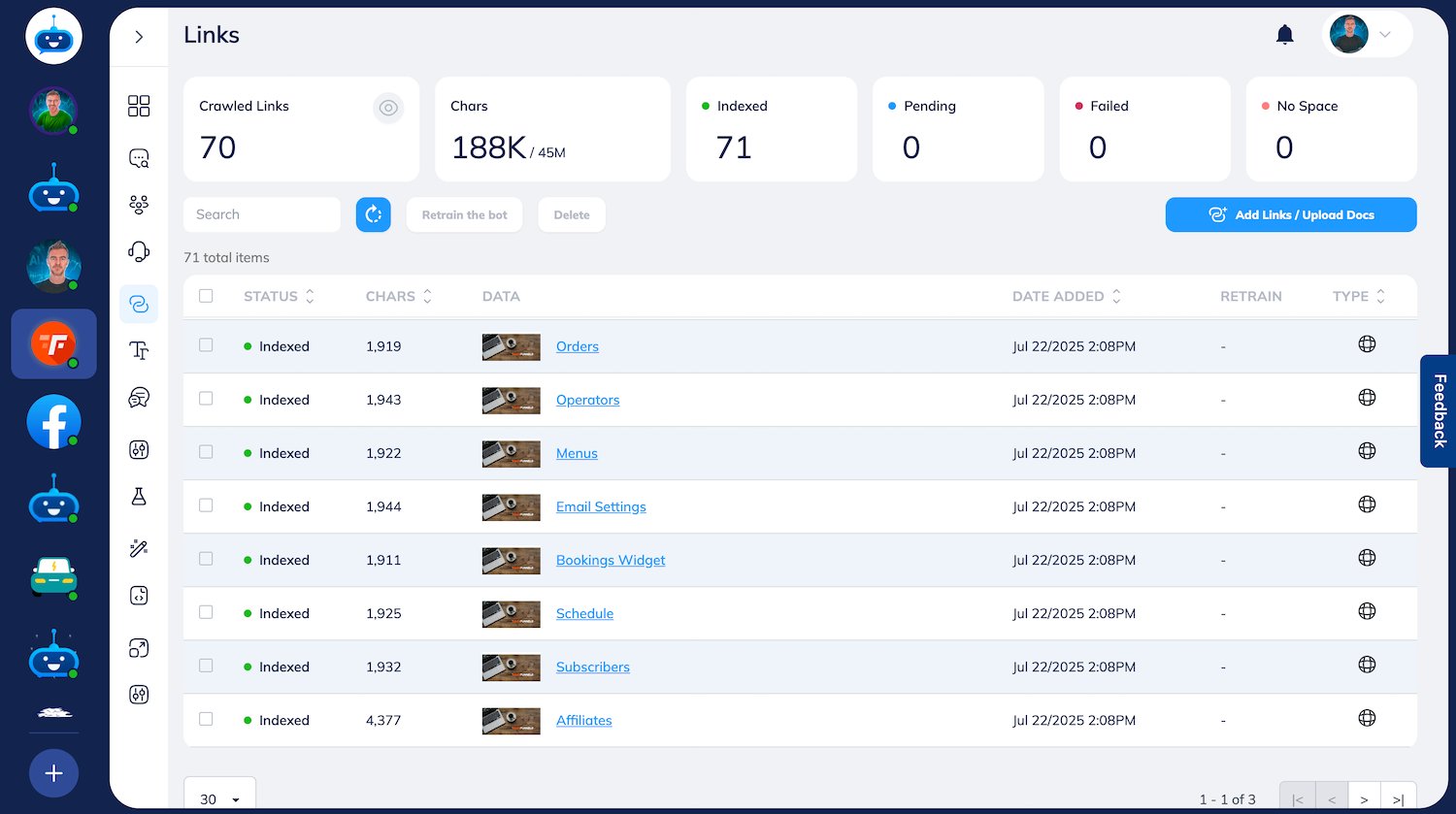
Crawl Your Website: Kick things off by giving FastBots.ai your website’s sitemap. The platform can use this to automatically index all your key pages—product descriptions, shipping policies, the "About Us" page, everything.
Upload Your FAQ: Next, export your FAQ page as a PDF or DOCX and upload it directly. This document is pure gold because it contains the exact questions your customers are already asking.
Add Detailed Product Guides: You probably have internal guides on topics like "How to Care for Your Leather Bag" or "Understanding Different Types of Leather." Once you clean these PDFs up, they provide expert-level knowledge the bot can use for more specific queries.
This layered approach combines broad public information with deep, internal expertise. It ensures your chatbot can handle a wide range of questions, from a simple "Where do you ship to?" to a more complex "What’s the best way to treat a scratch on a full-grain leather wallet?" This prep work is truly the most critical part of training a chatbot that actually helps your customers.
Configuring Your Chatbot's Core Intelligence
Once you've sorted out your knowledge sources, it's time to shape how your chatbot actually thinks. This is where you go beyond just feeding it data and start defining its personality, its rules of engagement, and its core logic. It’s what separates a basic document-finder from a genuinely intelligent conversational partner.

This part of the process involves tweaking the settings that control how the AI processes information and puts together its answers. Get these configurations right, and you’ll have a chatbot that doesn't just give accurate information, but does it in a way that feels like it’s truly part of your brand.
Understanding the Engine: RAG and Embeddings
At the heart of a modern chatbot, like the ones you build with FastBots.ai, is a technology called Retrieval-Augmented Generation (RAG). Instead of just making things up from its general training data, the AI first retrieves relevant snippets from your knowledge base. Then, it generates a natural-sounding answer based on that specific, factual information. This grounds the bot in reality, massively reducing the risk of it giving wrong or "hallucinated" answers.
To make RAG work, your documents are first broken down into smaller pieces in a process called chunking. Each of these chunks is then converted into a numerical representation—an embedding—that captures its semantic meaning. You can think of it as creating a super-detailed map of your knowledge, where related concepts are grouped closely together.
Embedding Models: These are the clever algorithms that create the embeddings. Different models have different strengths; some are brilliant with short, snappy text, while others are better at grasping complex, long-form documents.
Chunking Strategy: This determines how your documents get sliced up. Smaller chunks can give you laser-focused answers but might miss the bigger picture. Larger chunks capture more context but can sometimes water down the specific detail a user is looking for.
Honestly, experimenting here is key. If you're uploading a dense technical manual, larger chunks are probably better to keep the context of complex steps intact. For a simple FAQ document, smaller chunks will likely serve up more direct and punchy answers.
Crafting the Perfect System Prompt
The system prompt is your chatbot's mission statement and personality guide, all rolled into one. It's a set of instructions you write to tell the AI who it is, what its job is, how it should behave, and where its boundaries lie. This single block of text is arguably the most powerful tool you have for shaping the user experience.
A well-written system prompt goes way beyond a simple "be helpful." It sets the tone, defines the persona, and establishes crystal-clear rules of engagement. As you fine-tune your chatbot's core intelligence, looking into different AI brain architectures can give you some great insights into how these underlying instructions shape behaviour.
A great system prompt is like a director's brief for an actor. It provides the motivation, character background, and key lines, making sure every performance is perfectly in character and on-script.
Here are a few examples of what you can define in a system prompt:
Persona and Tone: "You are 'SupportBot', a friendly and patient technical support assistant for Acme Widgets. Use clear, simple language and avoid technical jargon. Always be encouraging."
Operational Boundaries: "You must only answer questions based on the provided documents. If you cannot find an answer, say 'I'm sorry, I don't have that information, but I can connect you with our support team.'"
Specific Tasks: "Your main goal is to help users troubleshoot product issues. If a user expresses frustration or asks to speak to a human, offer to start a live chat immediately."
This direct instruction is what enables the chatbot to understand its role. It's a vital part of Natural Language Understanding (NLU), which allows the bot to grasp what the user actually wants. For a deeper dive, check out our beginner's guide on how NLU works and why it's important. Getting this prompt right will transform your bot from a generic AI into a specialised, branded assistant that consistently delivers the right experience.
Testing and Refining Your Chatbot's Performance
Would you send a new employee to meet your biggest client without a single day of training? Of course not. Launching an untested chatbot is pretty much the same thing—a gamble that can damage trust in an instant. Before your AI assistant goes live, you need to put it through its paces. This isn't just about catching bugs; it’s about seeing how it holds up under pressure and making sure it's genuinely helpful.
This process goes way beyond asking a few obvious questions. It demands a proper framework that scrutinises every part of the chatbot's performance, from the accuracy of its answers to the consistency of its tone.
Designing Your Testing Framework
A solid testing plan is a mix of structured checks and creative, almost chaotic, methods. Think of it as putting the bot through a formal exam and then a real-world practical assessment.
First, build a 'golden set' of questions. This is your go-to list of the most common and critical queries you expect users to have. It should cover the basics, like questions on pricing, product features, or your return policy. Running through this list gives you a quick and reliable benchmark of the bot’s baseline accuracy.
Then, it's time for exploratory testing. This is where you and your team get to have some fun and try to break the chatbot. Ask questions in weird ways, use slang, make typos, and try to pull the conversation completely off-topic. The goal here is to mimic the wonderfully unpredictable nature of human chat and see how your bot copes with ambiguity and curveballs.
A well-rounded testing strategy should feel like a game of chess against your own creation. You need to think several moves ahead, anticipating how a user might try to corner the AI with confusing or complex questions.
During these tests, you're not just looking for a simple "right" or "wrong." You're grading the quality of the response across several key areas. This systematic evaluation is a core part of training a chatbot that people will actually want to use.
Key Evaluation Criteria
Before you start testing, it helps to know what you're looking for. A simple evaluation table can keep your team focused on the metrics that matter most, both before and after you go live.
| Metric | What It Measures | How to Improve It |
|---|---|---|
| Accuracy | Does the chatbot provide factually correct information based on its knowledge base? | Refine the source documents by removing conflicting or outdated information. Use more specific system prompts. |
| Relevance | Is the answer directly related to the user's question, or does it miss the point? | Adjust chunking and embedding settings to better capture the context of user queries. Clean up source data. |
| Tone & Persona | Does the response align with the personality defined in the system prompt? | Tweak the system prompt with more explicit instructions about voice, tone, and forbidden phrases. |
| Hallucinations | Does the bot invent facts or details that aren't in the source documents? | Strengthen the system prompt to forbid answering outside the knowledge base. Ensure RAG settings are correctly configured. |
Keeping an eye on these criteria will help you pinpoint exactly where your chatbot is excelling and where it needs a bit more work.
Gathering User Feedback for Continuous Improvement
Once your internal testing is done, it’s time to bring in the real experts: your users. A beta test with a small group is invaluable because they will interact with the chatbot in ways you never even considered. Their feedback is the qualitative data that transforms a good bot into a great one.
User preference trends should also guide where you focus your training efforts. For instance, knowing that 54% of users might ask about products while 23% are happy to resolve disputes with a chatbot helps you prioritise your knowledge base accordingly. To achieve high success rates (currently around 75%), your training data must cover a wide range of user intentions and emotions. In the UK, where nearly half of chatbot users have been engaging with them for over three years, there's a huge pool of conversational data available to help refine AI performance. You can find more chatbot statistics here.
Use the insights from both internal tests and user feedback to create a loop of continuous improvement. Jump into a platform like FastBots.ai and review the conversation logs to spot recurring problems or gaps in knowledge. Every confusing answer or failed query isn't a failure—it's a golden opportunity to refine your data, tweak your prompts, and make your chatbot smarter. This cycle of testing, analysing, and retraining is what really makes the difference.
Getting Your Chatbot Live and Making It Smarter Over Time
So, you’ve trained your chatbot and you’re happy with how it’s performing in your tests. Great! But the real work—and the real learning—starts the moment it goes live and meets your actual users. Getting it deployed is the exciting first step, but it’s the constant cycle of improvement that turns a good bot into an absolutely essential part of your business.
Going Live: Deployment and Rollout
Launching your chatbot is thankfully a lot simpler than it used to be. Platforms like FastBots.ai give you a few straightforward options that don’t require a team of developers. You can pop it onto your website with a simple snippet of code or hook it into the messaging apps your customers are already using every day.
Website Widget: This is the go-to for most people. It puts your chatbot front and centre, ready to help anyone who lands on your site.
Messaging Apps: Why not meet customers where they are? You can connect your bot to WhatsApp, Telegram, or Facebook Messenger.
Internal Tools: You could even integrate your chatbot with something like Slack to act as an internal helpdesk for your own team.
Once you've built and tested your chatbot, the next big step is the rollout. To make sure everything goes smoothly and you don’t run into any nasty surprises, it’s a good idea to follow established software deployment best practices. This helps ensure a clean transition from your testing setup to a live, production-ready tool that your users can rely on.
Keeping an Eye on Performance with Analytics
After your chatbot is live, data is your new best friend. This isn't a "set it and forget it" situation. You need to be actively watching its performance to see what’s landing well and what’s falling flat. Think of your analytics dashboard as mission control for your chatbot's ongoing education.
To begin with, just focus on a few key numbers (KPIs):
Resolution Rate: What percentage of chats does the bot handle successfully without a human needing to step in? A high number here is a great sign.
Escalation Rate: On the flip side, how often do users ask to speak to a person? If this number starts creeping up, it might mean there’s a new gap in your chatbot's knowledge.
User Satisfaction (CSAT): A simple "Was this helpful?" thumbs-up/thumbs-down at the end of a chat gives you direct, honest feedback on how well your bot is doing its job.
These metrics give you a clear, data-backed picture of how effective your chatbot is and shine a spotlight on the areas that need a bit more work.
The Never-Ending Cycle of Retraining and Refining
Your most valuable feedback comes directly from the conversation logs. Making a habit of reviewing these chats is like having a direct line to your customers' thoughts. You'll want to look for patterns, especially in the questions your chatbot fumbled or couldn't answer at all. These aren't failures; they’re a golden to-do list for your next training session.
Think of your chatbot as a new hire. On day one, it's brilliant at the things you've trained it on, but it will inevitably run into questions it's never heard before. Your job is to be the manager who provides the coaching—in this case, new data—so it can handle those situations perfectly next time.
The key is to create a simple, repeatable process. Maybe every Friday, you check the "unanswered questions" report. If you see the same question popping up, that's your cue to update the knowledge base. Perhaps you need to add a new section to your FAQs or upload a document explaining a new product feature.
This constant loop of monitoring, analysing, and retraining is the real secret to keeping your chatbot sharp, relevant, and genuinely helpful. The payoff is huge. In the UK, businesses in retail and banking are already seeing chatbots handle up to 70% of routine customer queries. This frees up human agents and slashes operational costs, with companies worldwide expected to save as much as $11 billion and reclaim nearly 2.5 billion working hours. This commitment to refinement is what ensures your chatbot continues to be a powerful, value-driving tool for your organisation.
Once your chatbot is live and interacting with users, the real work begins. The focus shifts from just getting it trained to making sure it’s a secure, trustworthy, and compliant part of your business for the long haul. It's no longer just about accuracy; it's about safeguarding data, meeting legal standards, and being ready for a global audience.
Think of it this way: protecting your chatbot is about protecting your brand. Every single chat could involve sensitive information, so having rock-solid security isn't just a nice-to-have, it's non-negotiable. We're talking about data encryption for information in transit and at rest, plus secure storage for all chat histories. For any business with customers in the UK or Europe, this also means getting General Data Protection Regulation (GDPR) right from the start.
Ensuring Compliance and Security
Your chatbot needs to be built with data privacy at its very core. Users must be told, in plain English, what data you're collecting and why. Just as important, you need to have a clear process for handling data access requests and the "right to be forgotten."
GDPR Adherence: Make sure your chatbot’s entire workflow respects GDPR principles, especially around getting clear user consent and how you handle their data.
Data Encryption: Any data shared between a user and the chatbot must be encrypted to shut the door on unauthorised access.
Secure Storage: Conversation logs and user details have to be kept in a secure, compliant environment, which is something platforms like FastBots.ai are built for.
Your chatbot is a digital front door to your brand. If it can't be trusted to protect user data, that damage reflects directly on your company's reputation. Security and compliance aren't add-ons; they're the foundation of a reliable AI assistant.
Implementing Multilingual Support
If you have a global customer base, your chatbot needs to speak their language—and I don't just mean a clunky, direct translation. Proper multilingual support means training your AI on high-quality, culturally aware datasets for every language you want to offer.
The best place to start is by gathering knowledge documents that are already in your target languages. If you don't have those, your next best bet is to use a professional translation service to convert your existing English materials.
When you're setting up the chatbot in FastBots.ai, double-check that the underlying model is up to the task of understanding and responding accurately across different languages. For those who really want to take it to the next level, you can dig into more advanced customisation. If that sounds like you, our guide on how to fine-tune an LLM for your chatbot is the perfect next step.
Got Questions About Training Your Chatbot?
Even with the best plan, you're bound to run into a few head-scratchers when training your chatbot. It's just part of the process. Getting these common questions answered early can save you a ton of time and keep your project moving smoothly. Let's dig into some of the queries we hear all the time.
How Much Data Do I Really Need?
There’s no magic number here, and it's always quality over quantity. A bot trained on ten clean, focused documents will smoke one that's been fed a hundred messy, contradictory files.
A solid starting point is to cover your top 10-20 most frequently asked questions.
Think about a new e-commerce bot. You’d want to upload your shipping policy, returns information, and maybe a few product care guides. This laser-focused approach means it can nail the most common queries right out of the gate. You can always expand its knowledge later as you spot gaps.
What Happens If My Bot Gets an Answer Wrong?
Seeing a wrong answer, sometimes called a "hallucination," can be worrying, but it's usually an easy fix. The first place you should look is your source material. Nine times out of ten, a wrong answer points to conflicting, outdated, or just plain unclear information in your knowledge base.
A chatbot giving a wrong answer isn't a failure of the AI itself. Think of it as a sign that its 'textbook'—your source data—has a typo. The quickest fix is almost always to find and correct the source document, then just resync your data.
You can also tighten the reins in your system prompt. Adding a simple instruction like, "Only answer questions using the provided documents. If the answer is not in the documents, state that you do not have the information," works wonders for stopping the bot from guessing.
Is It Okay to Train My Chatbot on My Competitor’s Website?
While it's technically possible, it's a really bad idea. Training your bot on a competitor's content is an ethical minefield and a recipe for brand confusion. Imagine your chatbot starting to recommend a rival's product or quoting their return policy—not a good look.
Stick exclusively to your own, verified content. This is the only way to guarantee every answer is accurate, on-brand, and actually helps your business. Your chatbot is an extension of your brand, and its knowledge needs to reflect that, period.
Ready to build a smart, reliable assistant for your business? With FastBots.ai, you can create a custom chatbot trained on your data in minutes, no coding required. Start your free trial today and see how easy it is.



