
How to Create an AI Assistant for Your Business


Before you even think about the tech, let's talk strategy. Building an AI assistant is less about code and more about a solid plan. I’ve seen too many people dive straight into the technical side, only to end up with a fancy tool that doesn’t actually solve a problem. The whole process starts with a clear, strategic foundation.
Defining Your AI Assistant's Purpose and Persona
So, where do we begin? The absolute first step is to figure out exactly what you want this assistant to achieve. Success starts by pinpointing a specific, tangible purpose.
Are you trying to slash the number of customer support tickets hitting your team's inbox, freeing them up for the really tricky stuff? Maybe you want to qualify sales leads 24/7, so you never miss a hot prospect. It could even be an internal tool, like an HR bot to help new starters get up to speed. Vague goals like "improve support" will get you nowhere fast.
Set Measurable Business Goals
Let's turn that purpose into something you can actually measure. This is what transforms your assistant from a cool gimmick into a strategic part of your business.
Instead of just "improving support," a much better goal is "reducing support ticket volume by 30% within six months." Instead of "helping sales," aim for "increasing qualified leads captured after hours by 15%."
These numbers give you a clear benchmark for success. They force you to answer the most important question of all: "What does a win look like for this project?"
Craft a Memorable and Authentic Persona
Once you know what your assistant will do, it’s time to decide who it is. A well-defined persona makes every single interaction feel consistent and on-brand. Nobody wants a jarring, generic response from a robot. This persona is the complete character of your AI, not just a name.
Think about these key elements:
Voice and Tone: Is your brand professional and straight-to-the-point, or is it more witty and informal? Your AI’s language needs to reflect that. An assistant for a law firm will sound completely different from one built for a quirky ecommerce shop.
Interaction Style: Should it be purely functional and direct, or more conversational and empathetic? This really depends on what it’s helping with and the likely emotional state of the user.
Name and Identity: Giving your assistant a name instantly makes it more approachable and less like a machine. For some great ideas on this, check out our guide on how to name your bot: tips and strategies for success.
The goal is simple: create an assistant that feels like a natural extension of your team. It should embody your company's values and communication style, building trust and familiarity with every conversation.
To really nail down the purpose and persona, you need to get inside your users' heads. Learning how to conduct user interviews effectively is an absolute game-changer here. Talking directly to your audience uncovers their real pain points, the language they use, and what they actually expect. This is the raw material you need to build an AI personality people genuinely want to interact with, not one they ignore.
Preparing the Knowledge Base That Powers Your AI
Now that you've got a clear goal and a personality for your AI assistant, it’s time to focus on the single most important part of the build: its brain. An AI is only as smart as the information you feed it. This is where you assemble its knowledge, piece by piece, using the data you already have scattered across your business.
Think of your knowledge base as the library your assistant uses to find answers. If the library is a mess, filled with incomplete or outdated books, the librarian (your AI) is going to give some pretty terrible recommendations. The aim here is to build a clean, comprehensive, and well-organised source of truth.
Gathering Your Raw Materials
First things first, you need to track down and collect every possible source of information. Most businesses are sitting on a goldmine of content that’s perfect for training an AI. A good place to start is the low-hanging fruit—the places you already store answers for customers and staff.
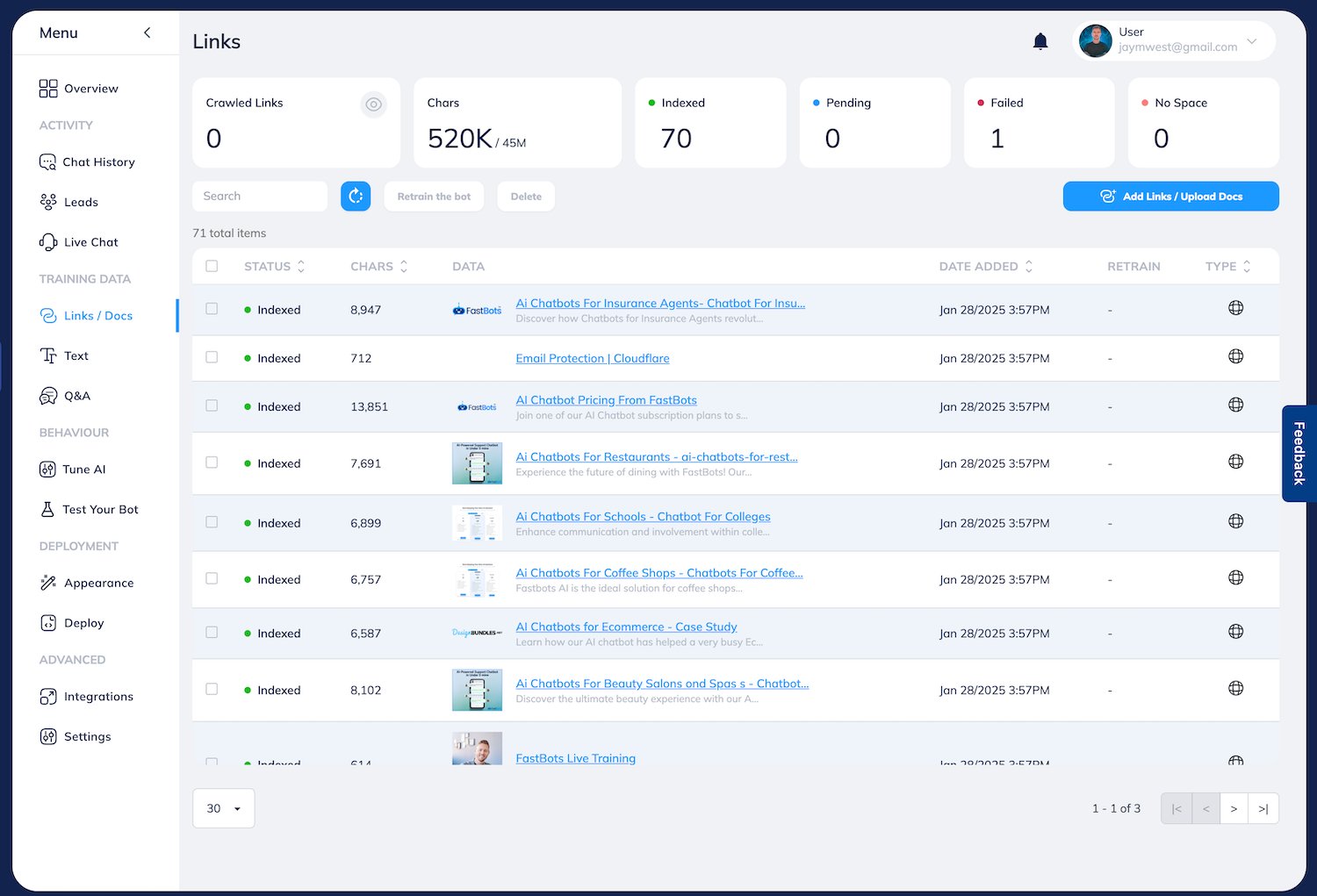
Common sources include:
Website Content: Your FAQ pages, help centre articles, product descriptions, and blog posts are prime candidates. This is usually the most accessible and customer-facing info you have.
Technical Documents: Don't ignore detailed product manuals, installation guides, or service specs, especially if they're in PDF or DOCX format. They're perfect for answering those nitty-gritty technical questions.
Structured Data: Spreadsheets (XLS or CSV files) with product catalogues, price lists, or feature comparisons can provide factual, easy-to-digest information.
Video Content: Yep, even YouTube tutorials or webinar recordings are valuable. Modern platforms can transcribe the audio and use the text to answer questions.
The goal is to be thorough. Grab anything that could possibly answer a question a user might throw at your bot. This first stage is all about quantity; the next step is where we focus on quality.
The Crucial Step of Data Cleaning
Just dumping a folder of random files into the system is a recipe for disaster. This is where a lot of AI projects go wrong, ending up with a bot that gives confusing, repetitive, or flat-out incorrect answers. You have to clean and refine your raw materials before you even think about training.
A well-prepared knowledge base is your single best defence against AI 'hallucinations' and inaccurate responses. Investing time here ensures your assistant builds trust with users by providing reliable, consistent answers from day one.
Data cleaning really comes down to a few key actions. First, eliminate duplicates. You might have the same returns policy written on a webpage and tucked away in a PDF. Pick one—the most up-to-date, authoritative version—to avoid confusing the AI.
Next, correct inaccuracies and update old information. If a price has changed or a policy has been updated, make sure your source documents reflect that. An AI trained on old data will confidently serve up wrong answers, and that’s a quick way to lose a customer’s trust.
Finally, improve structure and clarity. Break down long, dense documents into smaller, more focused chunks. Use clear headings and simple language. The easier you make it for a machine to read your content, the better it will be at finding the right answer. This whole process is fundamental, and we've got more practical advice in our guide covering tips for building a great knowledge base chatbot. By taking the time to prepare your content, you’re laying the foundation for an AI assistant that’s not just working, but is genuinely helpful.
Right, you’ve got your goals mapped out and your content is prepped and ready to go. Now for the exciting part: turning all that raw material into a smart, functional assistant.
This is where you move from planning to actually building. Thanks to modern no-code platforms, you don’t need a computer science degree. It’s more about smart configuration than writing complex code.

Putting the initial pieces together is surprisingly quick. You'll start by connecting the knowledge sources you prepared earlier. This is usually as simple as uploading your PDFs, pasting links to your website, or connecting your Google Sheets and YouTube channels. The platform takes it from there, digesting and indexing everything to make it searchable for the AI.
It’s no surprise that businesses are moving fast on this. In fact, by mid-2025, 14% of UK firms had already announced plans to bring in AI within three months, all chasing better efficiency. This rush makes it even more important to get the build process right from the very start.
Setting the Right Retrieval Scope
Once your data is plugged in, the next decision is a big one: defining the retrieval scope. Think of this as setting the ground rules for where your assistant is allowed to look for answers. Should it only use the documents you provided, or can it also tap into the broader knowledge of a large language model like ChatGPT?
It really comes down to what you need:
Strictly Internal Data: This is perfect for a support bot that needs to stick to the script. If a customer asks about your returns policy, you want it pulling from your policy document, not a competitor's. Restricting it to your knowledge base prevents it from inventing answers.
Hybrid Approach: For a more versatile assistant, you could let it use both your data and its general knowledge. This comes in handy when a user asks an industry-related question that isn't specifically covered in your own content.
Striking the right balance here is the key to making sure your assistant is helpful without going off-brand.
Defining Your Assistant's Personality with System Prompts
Now we get to give the AI its personality. This is done with a system prompt—a set of core instructions that acts as its behavioural guide. It dictates the tone, personality, and rules of engagement for every single conversation. It's basically a brand style guide for your AI.
Your system prompt is the foundational instruction that tells the AI how to be, not just what to say. A well-crafted prompt ensures every interaction feels authentic to your brand, whether it's witty and informal or professional and direct.
For instance, a prompt for a friendly ecommerce bot might say something like: "You are 'StyleBot,' the helpful fashion assistant for Acme Apparel. Your tone is upbeat, friendly, and encouraging. Always address users by their name if you know it, and use emojis sparingly to add warmth."
This one block of text shapes the entire user experience, making it one of the most powerful customisation tools you have. To really get the most out of your assistant, digging into the world of AI-powered content creation can give you the skills to write prompts that get results.
The Iterative Training Loop
Here’s a secret: launching your assistant isn't the finish line. It’s the starting pistol for a continuous cycle of improvement. A truly smart assistant learns from real-world interactions and gets better over time.
This process is a simple loop:
Analyse Chat Logs: Dive into the conversation history. What are people actually asking? Look for common questions, points of confusion, or queries where the AI got stuck.
Identify Knowledge Gaps: Did someone ask about a new feature you just launched? If it’s not in your knowledge base, that’s a gap.
Update the Knowledge Base: Fill those gaps. Add a new PDF, update a web page, or tweak an existing document with the missing information.
Retrain the AI: With the new info in place, you just hit 'retrain'. It’s often a one-click process that tells the assistant to learn from the updated content.
This "build, test, refine" loop is what keeps your assistant relevant and genuinely useful. If you want to get into the nitty-gritty of how this works under the hood, our article on how to train AI chatbots using machine learning and NLP offers a deeper technical look.
Put Your AI Assistant Where Your Users Are
A brilliant, well-trained AI assistant is only useful if people can actually find it and, you know, use it. Once you’ve built your AI’s brain and given it a personality, the next job is to place it right in the path of your users. Make it easy. Make it obvious. This means thinking beyond your own website and meeting them on the channels they already use every single day.
The most common place to start is with a website chat widget. That familiar little bubble in the corner of the screen is pretty much expected these days. It offers instant help without forcing someone to hunt for a contact page, grabbing their attention at the exact moment a question pops into their head.
But your assistant’s reach shouldn't stop at your homepage. You need to think about where your audience really spends their time. Deployment is all about being present in their existing routines and communication habits.
Meet Users on Their Favourite Channels
To properly weave your AI assistant into the customer journey, you have to show up on popular messaging platforms. This is where conversations are already happening, and being there makes everything feel effortless for your customers.
Here are the big ones to consider:
Social Messaging Apps: Hooking your assistant up to platforms like Facebook Messenger or Instagram DMs lets you handle questions, share product info, and even capture leads directly from your social media activity.
Global Communication Tools: For countless businesses, WhatsApp is the main line of communication. An AI assistant here can give instant support, send order updates, or answer FAQs for a massive global audience.
Internal Collaboration Hubs: If you’ve built an assistant for your own team, deploying it on a platform like Slack is a total game-changer. It can answer HR questions, find company documents, or offer IT support right inside the tool your team already has open all day long.
The goal is simple: make talking to your business as easy as messaging a friend. Every channel you add extends your reach and makes your brand more approachable, turning your AI into a genuinely helpful, always-on resource.
Before you jump in, it's worth weighing up where to focus your efforts. Different channels serve different purposes, and the integration effort can vary quite a bit.
AI Assistant Deployment Channel Comparison
| Channel | Primary Use Case | Integration Complexity | Best For |
|---|---|---|---|
| Website Widget | On-site customer support & lead capture | Low | Businesses wanting to convert website visitors and provide immediate help. |
| Facebook/Instagram | Social commerce & marketing enquiries | Medium | Brands with a strong social media presence and high engagement. |
| Order updates, FAQs & global support | Medium | Companies with an international customer base or those using it for direct comms. | |
| Slack/MS Teams | Internal employee support & HR | High | Organisations looking to automate internal workflows and information retrieval. |
Ultimately, the best approach is to start where your audience is most active and expand from there. Don't try to be everywhere at once; pick one or two key channels and nail the experience first.
Turn Answers into Automated Actions
Putting your AI everywhere is one thing, but empowering it to do things is another entirely. A truly effective assistant doesn't just answer questions—it takes action. This is where connecting your AI to automation platforms like Zapier or Make unlocks its real power.
Think of these platforms as the central nervous system for all your business software. By plugging in your AI assistant, you can create slick, automated workflows that trigger actions in other apps based on what’s said in a conversation.
A brilliant AI assistant doesn't just provide information; it drives outcomes. By integrating automation, you transform your bot from a passive Q&A tool into an active, value-driving part of your operational team.
Just imagine how this plays out in the real world:
Automated Lead Capture: A user says they’re interested in a demo. The AI not only answers their questions but also uses a Zapier connection to automatically create a new lead in your CRM, assign it to a sales rep, and send a follow-up email. Zero manual effort required.
Seamless Support Escalation: When a question is too tricky for the AI, it doesn't just give up. Instead, it can trigger a workflow that creates a detailed support ticket in a system like Zendesk or Jira, complete with the full conversation history.
Effortless Booking: A client wants to book a consultation. The AI checks your calendar via an integration, offers a few available times, and once the user picks one, it books the meeting and sends confirmation emails to everyone involved.
This level of integration transforms your assistant from a simple knowledge base into a proactive workhorse. It closes the gap between conversation and action, ensuring every user interaction has the potential to move your business forward, 24/7.
Keeping Your AI Secure and Building User Trust
When you bring an AI assistant into your business, the conversation has to shift quickly to security and governance. This isn't just another clever tool; it’s a gatekeeper for your data, interacting with both your customers and your team. Nailing the security and trust side of things isn't just a "nice-to-have"—it's the foundation for any long-term success.
Without a secure, company-approved assistant, you’re inviting a problem known as 'shadow AI'. This is when employees, trying to be productive, turn to whatever public AI tools they can find, creating massive data privacy and compliance risks. The rise of shadow AI in UK workplaces is a real headache; a Microsoft UK report found that a staggering 71% of UK employees have used consumer AI at work without getting the green light. The best way to get ahead of this is to offer a secure, in-house alternative they can actually use.
Putting Essential Security Practices in Place
Building a trustworthy AI means you have to be deliberate about how it handles information. This goes beyond just stopping data breaches; it's about showing you’re serious about looking after people’s data. A few core security measures will protect your business and give your users peace of mind.
Here are the key controls to get in place from day one:
Data Anonymisation: Make sure your platform automatically scrubs personally identifiable information (PII) from conversation logs. You don't want sensitive details like names, emails, or phone numbers hanging around. This is a simple but powerful way to protect user privacy.
Role-Based Access Controls (RBAC): Not everyone on your team needs to see every single chat. Set up different access levels so only authorised people can view conversation histories or analytics. It’s a basic step that dramatically limits internal data exposure.
Compliance Adherence: Your AI platform must be compliant with the regulations that matter to you, like GDPR in the UK and Europe. This means having clear data processing agreements and respecting a user’s right to access or delete their data.
These practices are the bedrock of a secure AI. They put you in control of your data and show users their information is in safe hands.
Designing for Transparency and Earning Trust
Security is one part of the puzzle, but building genuine user trust takes transparency. People are far more willing to engage with an AI when they understand what it can do and, just as importantly, what it can't. That’s why you absolutely must plan for the moments when the AI gets stuck.
A seamless 'human handover' is non-negotiable. When an AI hits its knowledge limit, the worst possible experience is a dead end. A trusted assistant knows when to say, "I'm not sure, but I can connect you with someone who can help right now."
That's not a sign of failure; it’s a feature of a smart, well-designed system. By building in a live chat function or a simple way to create a support ticket, you provide a safety net that guarantees a resolution. This kind of transparency builds confidence and reassures users they’ll always get the help they need, whether it comes from the AI or a human expert.
At the end of the day, when you create an AI assistant, you're creating a new front door to your business. It has to be secure, reliable, and fundamentally trustworthy.
Right, so you’ve launched your AI assistant. Job done? Not even close.
Getting your bot live is a huge first step, but it’s just the starting line. The real magic happens when you start listening to what it’s doing, learning from its mistakes, and making it smarter over time. This is what separates a gimmicky chatbot from a genuine business asset.
You need to get past the flashy numbers. A high conversation count looks great on a report, but it tells you nothing about whether the bot is actually helping anyone. Instead, you need to zero in on the metrics that actually matter – the ones that tell you if your assistant is doing its job and if your users are happy.
The Metrics That Actually Tell You Something
To get a real sense of how your assistant is performing, forget the fluff and focus on these core indicators:
Resolution Rate: This is the big one. What percentage of chats does the AI handle successfully from start to finish, without a human needing to jump in? This is your clearest measure of effectiveness.
User Satisfaction (CSAT): Don't guess if users are happy—ask them. A simple thumbs-up/down or a star rating at the end of a chat gives you instant, unfiltered feedback on how helpful the interaction was.
Human Escalation Frequency: How often are conversations being passed over to a live agent? If this number is high, it’s a massive red flag that your knowledge base has gaps or the questions are too complex for the bot to handle right now.
Most Frequent Topics: Digging into what people ask about most often is like getting a direct line into your customers' heads. It shows you exactly what they care about and where you should focus your efforts to improve things.
Tracking the right metrics turns your assistant from a black box into a source of powerful business intelligence. The data doesn't just show you how the bot is doing; it reveals exactly what your customers need and where your processes can improve.
This constant feedback loop is non-negotiable if you want an assistant that gets better with every conversation. And with AI becoming a part of everyday life, people’s expectations are only getting higher.
Just look at the numbers. As of July 2025, 20.2 million people in the UK were actively using AI tools, a figure that shot up by 112% in a single year. With 63% of 15-24 year-olds now using AI, your audience expects a smart, capable assistant, not a clunky robot. You can learn more about these AI usage statistics and what they mean for businesses.
Turning Data into Smarter Actions
Once you've got the data, it's time to roll up your sleeves.
Regularly dive into the conversation logs, especially the ones that failed or got a thumbs-down. These aren't failures; they're your best learning opportunities. Did the bot completely misunderstand the question? Was the right information simply missing from its knowledge base?
Use what you find to update your documents, add new Q&As, or tweak the assistant's instructions. This is the cycle of improvement that ensures your AI assistant doesn’t just stay static but grows into an indispensable member of your team.
Burning Questions About AI Assistants
When you start digging into how to create an AI assistant, a few questions always pop up first. Let's tackle the big ones: cost, coding, and what happens when the bot gets stuck.
How Much Does It Cost to Build an AI Assistant?
The price tag can swing wildly depending on the path you take. If you use a modern no-code platform, you can get a powerful, effective assistant up and running for under $39 a month. It's a game-changer for most businesses.
On the other end of the spectrum, a fully custom-built solution from a development agency can set you back anywhere from $10,000 to over $100,000. The final cost really depends on how complex you need the integrations to be.
Do I Need Coding Skills?
Not anymore, thankfully. The new wave of AI assistant builders are made specifically for business users. They have intuitive, visual interfaces that mean you'll never have to look at a line of code.
While a developer's touch is handy for really advanced API integrations, you can build, train, and launch a seriously capable assistant without writing a single line of code.
When your AI assistant can't answer a question, the best move is a seamless 'human handover.' Your bot should be smart enough to recognise its limits and immediately offer to connect the user with a real person—whether that's through live chat, email, or by creating a support ticket. This simple step turns potential frustration into a resolved issue.
Ready to build an AI assistant that actually helps your customers and automates your repetitive tasks? With FastBots.ai, you can create and deploy a custom AI trained on your own data in minutes. No coding required. Start your free trial today!



